Jota Builds

Small Windows apps. No surprises.

I'm Jota, and I build tools for PC gamers. AltVigil keeps every Roblox alt you run in one panel. Velox tunes Windows and keeps a backup of every change. Each one tells you what it does, what it connects to and what it costs.

AltVigil

Your accounts are still there when you get back.

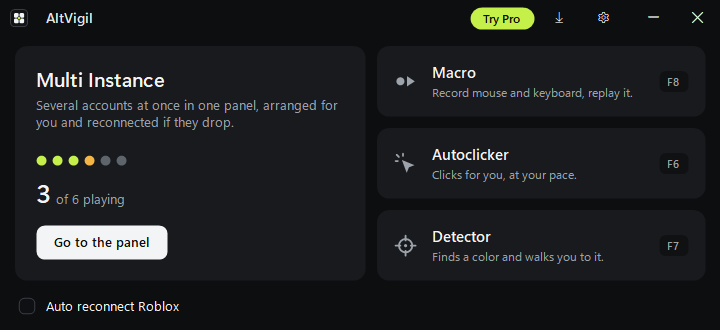
AltVigil opens every Roblox account you play in one panel, lays the windows out for you and opens again any that drop. It also records macros, clicks for you and finds things on screen.

Windows 10 or 11. Pro is free to try for 3 days inside the app, with no card and no sign-up.

AltVigil home screen in dark mode: Multi Instance, 3 of 6 accounts playing, Go to the panel, and the Macro, Autoclicker and Detector tools with their keys F8, F6 and F7

Multi Instance

Pin a game, press Open all, and every account joins it in its own window. AltVigil arranges them in a grid inside one panel and keeps an eye on each one. If Roblox kicks one out, it joins again on its own.

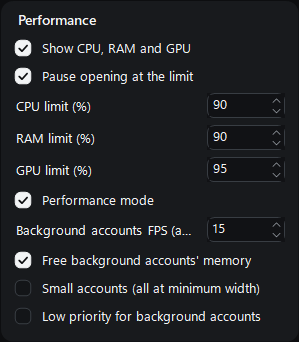
CPU, RAM and GPU are shown live. Set a limit and AltVigil waits before opening the next account, so your PC never chokes. With Pro, performance mode drops background accounts to a lower frame rate, frees their memory and can mute them.

Performance settings: show CPU, RAM and GPU, pause opening at the limit with CPU 90%, RAM 90% and GPU 95%, performance mode with background accounts at 15 FPS, and free background accounts' memory

Macro

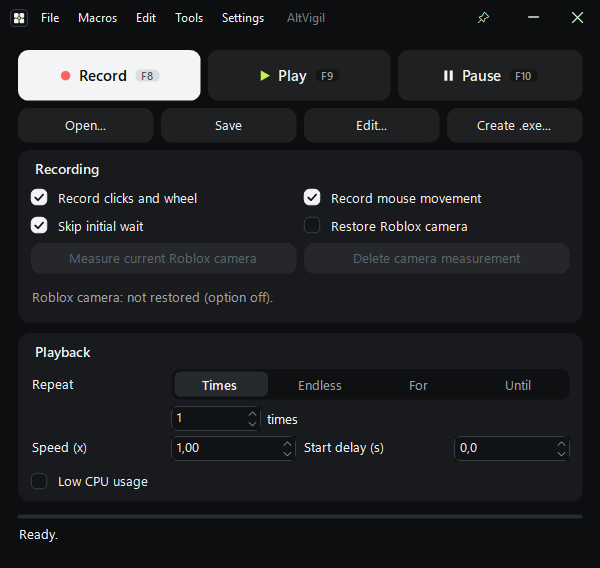
Record mouse and keyboard and play it back: a number of times, without end, for a set time or until a set time. Change the speed, edit the steps, or turn a macro into its own .exe.

F8 record   F9 play   F10 pause

Macro window with Record, Play and Pause, recording options, and playback set to repeat once at speed 1

Detector

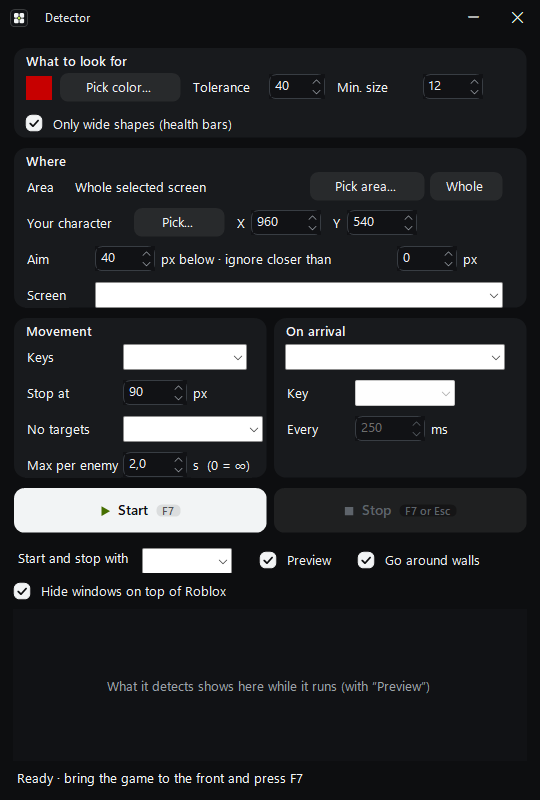
Pick a colour, like an enemy's health bar, and the detector walks your character to it. It goes around walls and presses the key you choose when it gets there.

F7 start and stop

Detector window: colour to look for, tolerance, area of the screen, movement keys and what to do on arrival

Autoclicker

Clicks for you, at the pace you set.

F6 start and stop

Auto reconnect

Lost connection? AltVigil gets you back into the game, in the free version too.

Discord alerts

With Pro, get a message on your own Discord server when an account drops or comes back.

How many alts do you run?

The free version runs 2 accounts at a time. Pro runs as many as your PC can handle, and opens again any account that doesn't come back on its own, with retries, also after a Roblox update.

6
2of 6 playing

The free version keeps 2 of your 6 accounts playing. Pro runs all 6.

Free or Pro

FeatureFreeFor goodPro$14.99, once
Accounts in Multi Instance2 at a timeNo limit
Reopen accounts that don't come backWith retries, also after a Roblox update—Included
Performance modeBackground FPS, memory, low priority, mute—Included
Discord alerts—Included
Restore the Roblox camera in macros—Included
Macro, Autoclicker, Detector, Auto reconnectCompleteComplete
UpdatesIncludedIncluded, for life

What AltVigil talks to

It runs the normal Roblox app, once per account, and arranges the windows. It doesn't inject anything into Roblox or read its memory. This is everything it connects to.

  • Roblox

    You sign in to each account on Roblox's own login page, inside AltVigil. Your password goes to Roblox, never to us, and the sign-in stays on your PC.

  • GitHub

    To check for new versions and download them.

  • Licence server

    Only if you try or buy Pro. It keeps an anonymous ID of your PC, the dates and the country of each check. It doesn't keep your name, email or IP address.

  • Discord

    Only if you add your own webhook for alerts.

Get AltVigil Pro

$14.99one payment, yours for life
  • No limit on accounts
  • Accounts reopen on their own
  • Performance mode
  • Discord alerts
  • Roblox camera restore in macros
  • Every future update
  • 2 PCs at the same time
  • Works 14 days offline

Try it first. Pro is free for 3 days inside AltVigil, one trial per PC, with no card and no sign-up. When the trial ends you go back to the free version and keep everything you set up.

Pay by card

Debit or credit card, on our secure SellAuth checkout.

Opening soon

Card payments open soon. Join the Discord to hear the moment they do.

Pay with crypto

Send the exact amount shown. The key arrives once the network confirms the payment.

Opening soon
BitcoinLitecoin

Crypto payments open soon.

  1. Pay. Your key shows on the order page at once and is emailed to you.
  2. In AltVigil, press Try Pro, then I have a key, and paste it.
  3. Pro turns on. To move it to another PC later, use Remove from this PC.

Update-proof refund: if a Roblox update breaks Pro and it isn't fixed within 7 days, every purchase from the last 60 days is refunded. By buying you accept the Terms of Service and the Refund policy.

Velox

A Windows optimizer you can undo.

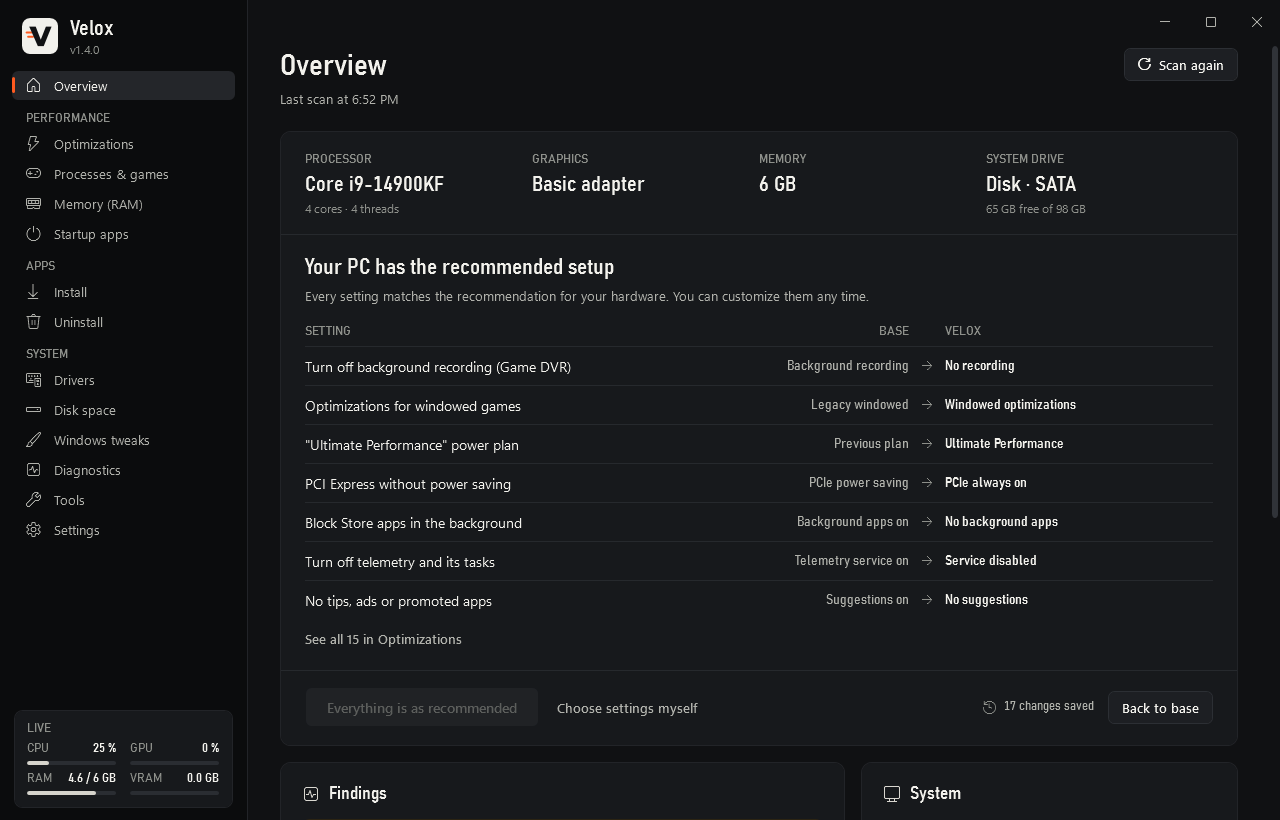
Velox reads your hardware and recommends only the settings that help it, from power plans to games, mouse and network. It saves every original value first, so any change goes back with one click.

FreeMIT licenceWindows 10 and 11, 64-bitEnglish and SpanishOne small .exe
Velox overview: processor, graphics, memory and system drive, then each setting Velox changed, from its base value to the new one, with Back to base
  • Made for your PC

    It reads your CPU, GPU, RAM, screens, disks and power plan. Three questions (laptop, competitive games, recording with OBS) fine-tune what it recommends.

  • 37 optimizations

    In seven sections, the most noticeable first. Settings that trade security for FPS carry a red Risk badge, are never part of Recommended, and ask before they change.

  • Undo anything

    A restore point before the first change, a backup of every original value, a history of what changed with an Undo on each row, and Undo everything.

  • Install and remove apps

    Tick apps from a catalog of 85 and Velox installs them silently from their official sources, with no toolbars or offers. Uninstall several at once; Windows parts are protected.

  • Drivers from the source

    Only from Windows Update and NVIDIA's own server, with the signature checked. Never BIOS or firmware, never an older version, and a Roll back button per device.

  • Memory, disk and tools

    Free RAM without closing programs, a map of what fills your drive, a deep clean that measures first, one-click DNS, a polling-rate meter and a health report.

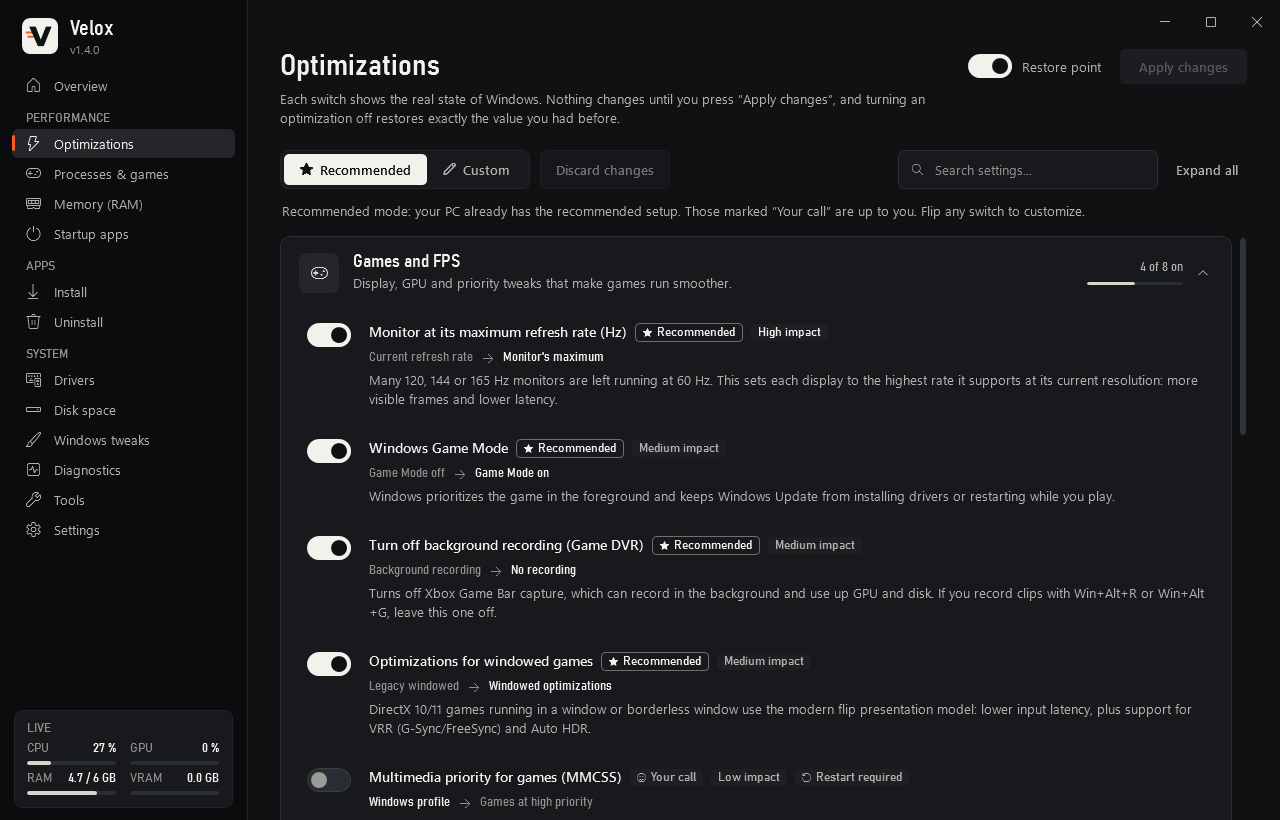
Velox optimizations, Games and FPS section: monitor at its maximum refresh rate, Windows Game Mode, background recording off and windowed game optimizations, each with its impact and what it changes
Every switch shows the real state of Windows, what it changes and how much it helps.

What Velox won't do

  • Touch Defender, UAC or the firewallMemory integrity and CPU mitigations only change if you choose to, after a Risk warning, and the same switch turns them back on.
  • Turn off Windows UpdateAnd it doesn't uninstall the apps built into Windows.
  • Fake your mouse polling rateThat's set by the mouse. The built-in meter tells you what you have.
  • Placebo tweaksNothing is recommended unless it helps on your hardware, and low-impact settings say so.
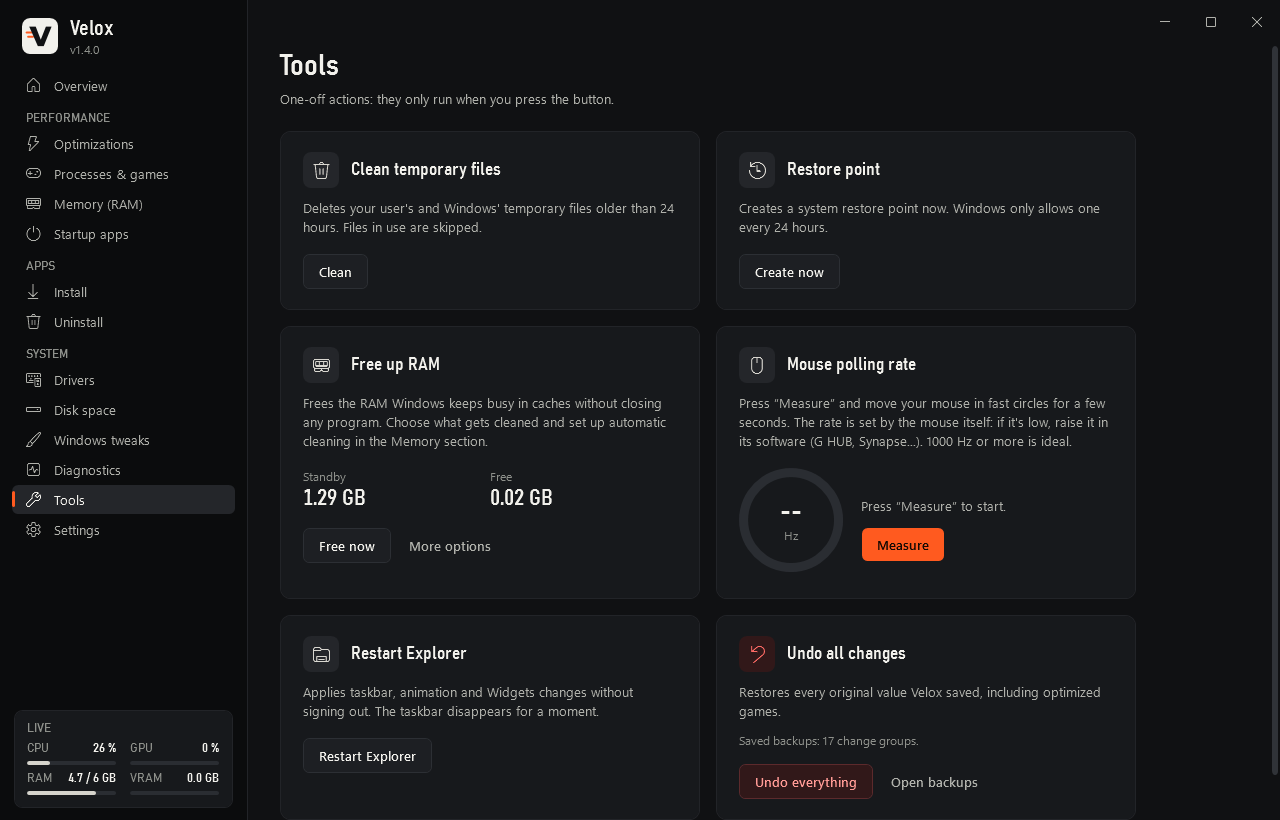
Velox tools: clean temporary files, restore point, free up RAM, mouse polling rate meter, restart Explorer and undo all changes
Tools run only when you press the button, and Undo all changes is always one click away.

Questions

Straight answers. If yours isn't here, ask in the Discord: open a ticket in #support.

AltVigil

Can I get banned for using several accounts?

Roblox staff said in July 2025 that they consider running several clients at once an exploit, but don't ban for it, and that this could change. Some games also have their own rules about alts and macros. AltVigil doesn't inject anything into Roblox or read its memory. Use it within the rules of the games you play.

Does the free version expire?

No. The free version stays free, with Macro, Autoclicker, Detector, Auto reconnect and 2 accounts at a time in Multi Instance.

What happens when the 3-day trial ends?

AltVigil goes back to the free version. Your accounts, macros and settings stay. Each PC gets one trial.

Can I use my key on another PC?

Yes. One key works on 2 PCs at the same time. To move it, press Remove from this PC on the old one, then activate it on the new one. You can do that up to 3 times a month; for more, support moves it for you.

Does Pro need the internet?

To activate, yes. After that AltVigil checks the licence once a day while you use it, and keeps working for 14 days without a connection.

How do refunds work?

You can try Pro for free first, so a purchase is final once the key is delivered, except if you were charged twice, if the key never arrived and support couldn't fix it within 7 days, or under the Update-proof refund: if a Roblox update breaks Pro and it isn't fixed within 7 days, purchases from the last 60 days are refunded.

Talk to support first. The full text is in the Refund policy.

How does paying with crypto work?

Choose Bitcoin or Litecoin on the checkout and send the exact amount shown. The key appears once the network confirms the payment. That usually takes a few minutes with Litecoin, longer with Bitcoin.
Velox

Is Velox really free?

Yes. It's open source under the MIT licence, and the code is on GitHub.

Can I undo everything?

Yes. Turning a switch off restores exactly what you had, and Tools › Undo everything restores every saved value at once. Velox also makes a restore point before its first change.

Why does it ask for administrator rights?

It changes system settings, so Windows needs your permission. It never touches Defender, UAC or the firewall.

Both

Why does Windows SmartScreen warn me?

The apps aren't code-signed yet, so Windows may warn you the first time. Choose More info, then Run anyway. Download them only from this site or GitHub.

How do updates work?

Both apps update themselves from their official GitHub releases, and check the file before they swap it in. AltVigil tells you when a new version is out; in Velox, use Settings › Update Velox.

Where do I get help?

On the Discord: open a ticket in #support.